
Purposeful screen time is when a screen gets students doing real learning work, such as explaining, practising, checking or responding, instead of just occupying their attention. It supports a clear learning goal and leads to useful action by the student or teacher. Judge it by what students think about, practise or correct on the device, and by what you or they do once the screen goes dark. Minutes on a device only tell you how long, never how well.
Key takeaways
- Purposeful screen time gets students explaining, practising, checking or responding instead of just occupying their attention, and it leads to a student or teacher action.
- A screen-time limit tells you how much. It does not tell you whether the learning was worth those minutes.
- The Education Endowment Foundation’s 2019 guidance report found that technology itself is unlikely to improve learning, so the task design carries the weight.
- Five questions work as a checklist before any lesson goes on a screen: purpose → value → thinking → evidence → action.
- A digital task has done its job when it changes what happens next, and that can mean putting the devices away.
Why does a screen time limit not answer the real question?
A limit tells you how much. It cannot tell you whether the minutes under it were worth spending. Minutes are easy to count. Whether a task helped a student learn is harder to see, and it is the part a limit leaves out.
Limits are a start, and they are coming. NSW public schools begin limiting digital learning time from Term 1 2027, mandatory from 2028, and Victoria is moving from 2027. NSW has said it wants screens to stop being the automatic choice for learning in public schools, so the useful question is one of design: what is each screen task there to do? In New Zealand, screen use has become an election issue, with National promising to ban screens in early childhood centres and tightly limit them in Years 1 to 3 if re-elected.
Those limits answer a question about quantity. More than 85 Australian experts and organisations, led by University of Wollongong researchers Dr Karley Beckman and Associate Professor Tiffani Apps, have argued that the question for learning is a different one. Dr Beckman put it this way: “what actually matters for learning isn’t how many minutes a student spends looking at a screen but what they’re doing with it, why, and with whom.”
That leaves you with a sharper question to ask of every lesson: what is the screen allowing students to do that matters for learning?
Here is the difference in practice. A passive task has students watching, scrolling or tapping along, and finishing is the only sign it worked. An active task makes them produce something: they put an idea in their own words, work a problem, discover what they got wrong and have another go. The first fills the time. The second leaves you something to act on.
What five questions should you ask before putting a lesson on a screen?
Before you put a lesson on a screen, ask five questions: purpose → value → thinking → evidence → action.
Start with the learning, not the tool. The learning might be a new concept, a maths procedure, scientific reasoning, vocabulary, a writing skill or applying knowledge in an unfamiliar context. Sometimes a device will serve it best. Sometimes paper, discussion, practical work or your own modelling will.
Each question catches a different way a digital task can drift from its purpose. A task that passes all five has earned its place.
1. Purpose
Best for: catching a task that was chosen because the resource happened to be digital, such as a Year 8 class clicking through a sequence with no clear goal.
Why it works: the EEF’s 2019 guidance report opens with the recommendation to consider how technology will improve teaching and learning before introducing it, because technology itself is unlikely to improve learning.
Classroom example: before a Year 10 maths lesson, write one sentence on the board for yourself: “Students will fluently expand double brackets.” If the digital task does not serve that sentence, change the task.
Watch out for: a purpose that describes the activity (“complete the module”) rather than the learning (“explain why the method works”).
Ask what exactly students are learning. If the answer is hard to state, clarify the goal before you choose any tool. A task without a purpose will not improve with better technology.
2. Value
Best for: deciding between a screen and paper when both would cover the content, such as a Year 9 science revision set.
Why it works: some things technology does well are hard to match by hand, including repeated low-stakes quizzing, which Dunlosky and colleagues (2013) rated as a high-utility study technique alongside distributed practice.
Classroom example: a Year 7 languages teacher sets a short vocabulary quiz that returns instant results for 28 students, then uses the first five minutes of the next lesson to reteach the three words most students missed.
Watch out for: a worksheet that has simply moved online. If the only answer to “what does the screen add?” is availability, paper is probably the better choice.
Ask what the screen allows students to do that matters for learning, such as instant feedback, a model they can manipulate or a quick read of the whole class. If the answer is nothing that another approach would not do as well, don’t use the screen. Choosing digital only when it adds something is the opposite of choosing it by default.
3. Thinking
Best for: any task where students could hand the hard part to the tool, including AI writing tools in Years 9 to 12.
Why it works: learning is a change in long-term memory (Kirschner, Sweller and Clark, 2006), which is why the retrieving, explaining and problem-solving need to be the student’s own.
Classroom example: a Year 11 English student drafts a paragraph, receives feedback that prompts a second attempt and rewrites it, rather than asking a tool to produce the paragraph and tidying the result.
Watch out for: two tasks that look identical on screen but ask for different amounts of thinking. A tool can make work easier without making it more educational.
Ask whether the technology supports the thinking students need to do or quietly does it for them. On screen, the two tasks can look identical. What differs is how much thinking each one asks of the student. At the PISA 2025 release, the OECD’s Secretary-General made a similar point about technology and AI: they help when used with a clear purpose and do not stand in for the effort and understanding students need to bring. St Mary MacKillop College’s Trent Wilson puts the school’s aim simply: students seeing AI as “a tool that assists, not replaces, their effort”.
4. Evidence
Best for: a short check partway through a unit, when you need to know which concepts are secure before you plan the next lesson.
Why it works: feedback is most useful when it answers where a student is going, how they are going and where to next (Hattie and Timperley, 2007), and a short check is the quickest way to find out.
Classroom example: a Year 9 maths teacher runs a five-question check on linear equations and finds that eight students are making the same sign error, a pattern that is easy to miss in individual books.
Watch out for: collecting data for its own sake. A score or dashboard is only useful if it helps you answer which concepts are secure, where the barriers sit and who needs another explanation.
Ask what the task will tell you about learning. Technology can gather and organise evidence, but what that evidence means in the context of the students in front of you remains your call.
5. Action
Best for: closing the loop on any digital task, so the result changes what happens in the next ten minutes or the next lesson.
Why it works: the third of Hattie and Timperley’s (2007) feedback questions, “where to next?”, is the one that turns information into improvement, and it only works when something follows.
Classroom example: after a Year 8 science quiz shows confusion about the water cycle, the class puts devices away and works through a diagram together on the board before attempting the questions again on paper.
Watch out for: a task that ends at the score. If nothing changes afterwards, the activity has not done much beyond occupying the time.
Ask what students or you will do with the result. A quiz might lead to reteaching, feedback to another attempt, practice to independent application. A digital task that shows the class needs to stop and talk has done exactly what it should.
What does purposeful screen time look like in a Year 9 science lesson?
Picture a Year 9 class learning about particle theory.
The teacher shows a short digital model of particles in solids, liquids and gases. Students then answer several questions independently. The results show that a group of students are confusing particle movement in liquids and gases.
The teacher calls that group together for a second explanation and a worked example. The rest of the class moves to a written task, explaining the difference in their own words. The devices are no longer needed.
The technology did four useful jobs. It made the concept visible, provided practice, revealed a misconception and informed the teacher’s next decision. The ten minutes on screen mattered less than what happened because of them. For a subject-specific version, see purposeful screen time in science.
The lesson also shows the shape of purposeful use:
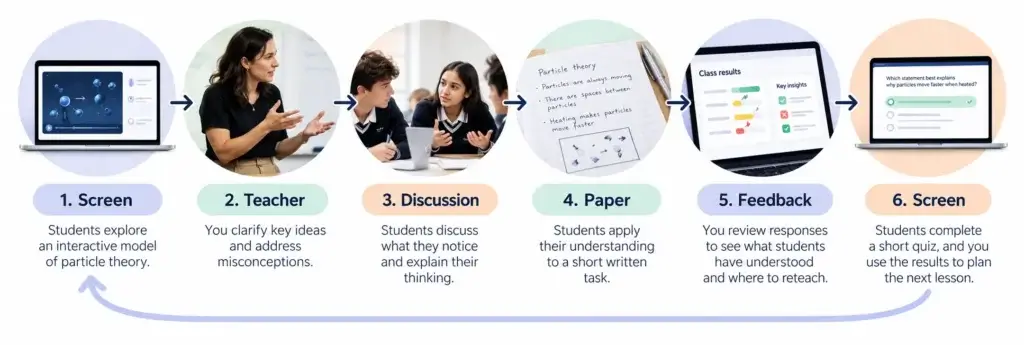 The format changes because the learning need changes. Run the five questions over the lesson and each one has an answer: a clear purpose, a model that added value, students doing the explaining, evidence from the questions and an action that followed.
What should you do when a task fails one of the questions?
Treat the failed question as the thing to fix. Match the answer you cannot give to the change that follows:
- If you cannot say what students are learning, clarify the learning goal before you choose any tool.
- If the only thing the screen adds is availability, use paper or another approach and keep the screen for tasks where it earns its place.
- If the tool is doing the thinking, redesign the task so students explain, answer or draft first, then use the tool to respond.
- If the task will not tell you anything about learning, add a short check, or drop the task.
- If nothing will happen afterwards, plan the next step before you set the task, including putting the devices away to reteach or discuss.
A purposeful lesson moves between formats. It does not stay on the screen as long as possible, and it does not avoid it on principle.
What gets in the way of purposeful screen time?
Four mistakes recur across subjects and year levels.
Treating a time limit as a quality test. Staying under a cap says nothing about whether the allowed minutes were used well. Spend the allowance on tasks that pass the five questions.
Mistaking engagement for learning. A class can be quiet, busy and absorbed without learning what the lesson set out to teach. Shane Smith, co-founder of Education Perfect, describes the tension in the Well-MeasurED podcast as the gap between what feels good to a student and “the things that really move the dial.” Success students can recognise as their own tends to motivate more reliably than entertainment, a point explored in why student motivation comes last.
Collecting evidence with no next step. Data that does not change a lesson is a tidy record of what already happened.
Letting the tool think for students. This is the highest-stakes mistake as AI tools reach more classrooms. It is covered in detail in where AI in education is delivering and where it is falling short.
Each of these comes back to the same check: what is the technology helping students learn, and what will happen next because of it?
Frequently asked questions
What is purposeful screen time?
Purposeful screen time is when a screen gets students doing real learning work, such as explaining, practising, checking or responding, instead of just occupying their attention. It supports a learning goal and leads to useful action by the student or teacher. The device might make an idea visible, provide targeted practice, give feedback while students can still act on it, or reveal a misconception that shapes what you teach next.
Is screen time bad for learning?
Neither good nor bad by default. A hammer can put up a house or tear one down. The difference is who is swinging it, and why. A screen works the same way.
How is purposeful screen time different from a screen-time limit?
A limit caps how much class time can be digital, which answers a question about quantity. Purposeful screen time asks whether the learning was worth those minutes. The two work together: a cap sets the ceiling, and the five questions help you decide which tasks deserve the minutes you have.
How can you tell whether a digital task is worth the time?
Before you put a lesson on a screen, ask five questions: what are students learning (purpose), what does the screen add (value), who is doing the thinking, what will it show you (evidence) and what happens next (action). A task that fails any of them needs redesigning, or leaving off the screen.
Does purposeful screen time mean using less technology?
Not necessarily. Sometimes it means less, because paper or discussion suits the learning better. Sometimes it means the same amount used more deliberately. The aim is a lesson where each format is chosen for the learning need, and the screen is switched off once it has done its job.
How does AI fit into purposeful screen time?
The same test applies: who is doing the thinking? A student who drafts an answer and uses feedback to improve it is practising. A student who asks a tool for the answer and tidies it is doing something different. Task design decides which one happens.
Who should lead purposeful screen time, the teacher or the technology?
The teacher. You set the learning goal, interpret the evidence and choose the next step, while the technology gathers responses, gives feedback and shows patterns. A tool can organise information about learning, but deciding what that information means for the students in front of you remains a teaching decision.
Does purposeful screen time mean every student needs a device?
No. Technology use can be teacher-led, such as guided practice on a class screen with no student devices, followed by a short activity of 10 to 15 minutes. That activity can be on paper, in a group or on a device. A shared screen the teacher uses to demonstrate a method to the whole class is a different thing from thirty individual devices. NSW’s recommended time limits apply to individual student devices, but its wider principle covers every screen, interactive whiteboards included: a screen should earn its place by being a better option for learning than the alternatives. The aim is deliberate use, and how the lesson is run matters more than the format.
How do you judge a digital tool, not just a single task?
A tool needs the same scrutiny as a task, with a few extra questions. Does it make students produce an answer, or only recognise one? If a student gets something wrong, can they try again with support, or is that simply logged? Does it point to what you should do next, or merely report what happened? Can you still use it with the devices shut, by printing it or projecting it for discussion? And can you see how many students its evidence covers and what that evidence could not show? Our screen-time hub sets these questions out in full, and we are happy for you to put them to us.
Related articles
- The learning science behind good Edtech
- Screen time and learning: what makes a minute count
- Fit for purpose: the screen nobody is arguing about
- Purposeful screen time in science
- Six classroom ideas for making digital minutes count under the NSW screen-time guidelines
- Why student motivation comes last
- Assessment for learning: principles, examples and practice
- Where AI in education is delivering, where it is falling short, and what to do next
References
- Beckman, K. and Apps, T. (2026). Researchers warn ‘digital detox’ in schools may do more harm than good [Position Statement media release]. University of Wollongong. https://www.uow.edu.au/media/2026/researchers-warn-digital-detox-in-schools-may-do-more-harm-than-good.php
- Dunlosky, J., Rawson, K. A., Marsh, E. J., Nathan, M. J. and Willingham, D. T. (2013). Improving students’ learning with effective learning techniques. Psychological Science in the Public Interest, 14(1), 4-58.
- Hattie, J. and Timperley, H. (2007). The power of feedback. Review of Educational Research, 77(1), 81-112.
- Kirschner, P. A., Sweller, J. and Clark, R. E. (2006). Why minimal guidance during instruction does not work. Educational Psychologist, 41(2), 75-86.
- NSW Government (2026). Screentime limits in public schools to lift our game in the classroom. https://education.nsw.gov.au/news/latest-news/screentime-limits-in-public-schools-to-lift-our-game-in-the-clas
- OECD (2026). PISA 2025: Students’ reading and mathematics performance declined sharply across the OECD [Press release]. 8 September. https://oecd.org/en/about/news/press-releases/2026/09/pisa-2025-students-reading-and-mathematics-performance-declined-sharply-across-the-oecd.html
- Stringer, E., Lewin, C. and Coleman, R. (2019). Using digital technology to improve learning: Guidance report. Education Endowment Foundation. https://educationendowmentfoundation.org.uk/education-evidence/guidance-reports/digital
- Well-MeasurED podcast, Episode 4: Shane Smith. Education Perfect.
- 1News (2026). National promises screen ban in early childhood education. 20 September. https://www.1news.co.nz/2026/09/20/national-promises-screen-ban-in-early-childhood-education/
- AAP (2026). NSW government enforces school screen time limits from 2027. The Leader. https://www.theleader.com.au/story/9349064/nsw-government-enforces-school-screen-time-limits-from-2027/
Who this article is for
This article is for Year 7 to 12 teachers in Australia and New Zealand who are planning next term with devices in the mix, whether a state cap applies to you or you simply suspect some digital tasks are not earning their place. You are not after a verdict on technology. You want a way to judge a digital task before you set it, and to decide what happens after it.
Rachel Ellis, MA Applied Linguistics – Last updated: 31 October, 2026