
For many educators, the rapid rise of artificial intelligence (AI) can feel daunting. With countless new tools and fresh challenges around academic integrity and data security, feeling overwhelmed is a common starting point.
Real classroom and school-level accounts show what that looks like in practice, and where the evidence for it still has limits.
What is AI in the classroom?
AI in the classroom refers to the use of artificial intelligence tools to support teaching and learning tasks such as differentiation, lesson planning, feedback, assessment and retrieval practice. The most useful applications support teacher judgement and student thinking rather than replacing either, a distinction that matters more than any single EdTech tool’s features.
In practice, teachers can use AI to:
- Differentiate explanations and resources for different learners.
- Give students immediate feedback on open-ended work.
- Generate retrieval-practice questions and assessment ideas.
- Identify patterns in student responses that would take longer to spot by hand.
- Redesign assessment so students have to demonstrate their own thinking, not just their access to information.
Shane Smith, co-founder and head of AI innovation at Education Perfect (EP), discussed practical uses of AI in schools with Matt Titmanis, head of science at Bob Hawk College in Western Australia, during a recent EP webinar. Their conversation makes one thing clear: AI isn’t coming to replace teachers. Used intentionally, it clears space for the parts of teaching a machine simply can’t replicate.
Key takeaways
- The design test that matters. Whether a tool scaffolds a student’s thinking or simply finishes it for them determines whether it helps, or stops it developing.
- A real loop, not a demo. A Year 11 exit-ticket process that used to take a day or two now returns feedback to students within seconds: a genuine account from a real department, not a vendor script.
- Assessment redesign beats bans. Shifting toward in-class validation and setting clear per-task rules for AI use matters more than trying to police AI outright.
- Healthy scepticism, always. Rigorous, causal evidence on AI in school classrooms is still thin: a 2026 Stanford review found just 20 such studies out of more than 800 examined.
What does AI actually solve for a teacher?
Two persistent problems: differentiation and workload.
Bob Hawk College is what Titmanis calls “a fully inclusive school”: rather than being taught in separate special education classes, students across a wide range of abilities, including those with additional learning needs, sit in the same mainstream classes as everyone else. Differentiation, adjusting a text to an appropriate reading level, or building an alternative version of a lesson that still teaches the same content, has always been essential, and can be one of the most time-consuming parts of the job.
“That has just been something that has really been a significant time sink for staff as they try to prepare for their classrooms,” Titmanis says of that adjustment work before AI tools were part of his team’s workflow.
The underlying goal isn’t new. Teachers have tried to personalise instruction by hand, one student at a time, for as long as mixed-ability classes have existed. What AI changes is whether that goal is achievable at the scale of an actual class of thirty, not just for the two or three students a teacher has time to reach individually.
The honest caveat: personalised differentiation only works if the teacher is still deciding what the lesson does. The tool should carry out that plan, not replace the teacher’s own sense of what the class needs right now. Titmanis is direct, saying his department’s AI use has, so far, focused far more on teacher workflow than on direct student use, partly because WA’s (Western Australia) approved-software list currently restricts open chatbots for students. Using tools already cleared for data-handling that use AI, EP among them, let Bob Hawk College keep innovating without waiting for policy to catch up.
Can you trust AI with student data?
Schools now run more digital platforms than ever: assessment, reporting, communication, personalised learning. Each one processes sensitive student data. The recent ASBA AI Preparedness Survey suggests that many schools still have a significant governance gap, with lack of leadership awareness of AI’s potential impact identified as perhaps the greatest risk.
Google Workspace and EP were already on Bob Hawk College’s approved list before AI entered the picture, because both had already been through the school’s existing vetting process. When EP later built AI into its feedback tool, that feature inherited the scrutiny already applied to the platform, rather than triggering a fresh approval process from a standing start. Part of that scrutiny is independently verifiable rather than self-described: EP’s AI component has gone through Safer Technologies for Schools (ST4S) certification, including the AI-specific component ST4S introduced in 2024: a check on how the AI itself handles student data, not just a description EP wrote about its own security.
How should AI feedback actually work?
The design test is simple: does the tool do the thinking, or does it make the student do more of it?
A tool built around that principle refuses to finish a student’s answer for them; a tool built to feel impressive in a demo often does exactly that.
Smith describes the distinction this way when explaining the choice behind EP’s own feedback tool:
“It’s not a chatbot. And it doesn’t do the heavy lifting. It refuses to do the heavy lifting for students.”
Trent Wilson, Head of Digital Learning at St Mary MacKillop College, a Prep–Year 12 Catholic college near Canberra, made the same distinction when deciding how to let AI into classrooms:
“It’s not a chatbot students can prompt back and forth, it’s teacher-led and task-specific. This gives teachers full control over content and the type of feedback students receive, without exposing younger learners to the unpredictability of public AI platforms.”
The same logic shapes how the college talks to students about what AI is for. “We’re trying to change the thinking that AI is just something that does the work for you,” Wilson says. “We want students to see it as a tool that assists, not replaces, their effort.”
The mechanism matters more than the label. A tool marketed as “AI-powered” says nothing about which side of the scaffold-versus-shortcut line it sits on. The question worth asking of any tool, EP’s included, is narrower and more useful: what happens to a student’s below-standard answer, and does the system ask for more before it lets them move on?
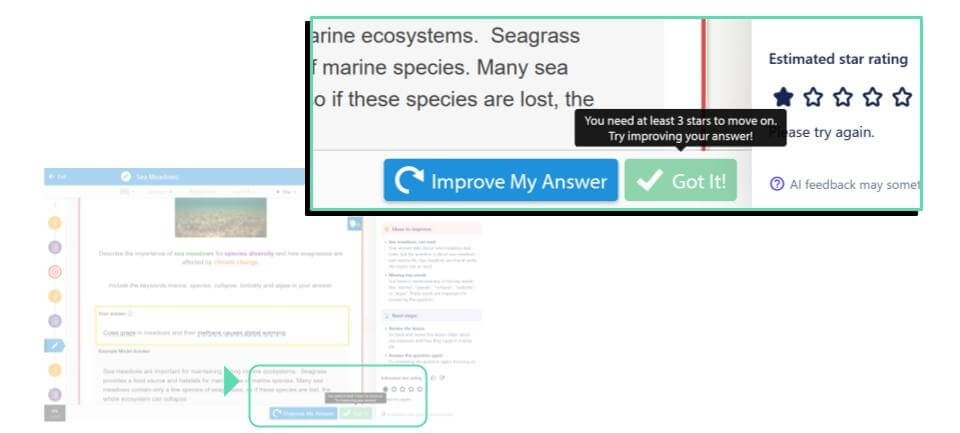
What does an AI feedback loop actually look like in a real lesson?
Titmanis’s department used to run exit tickets and mastery checks through Microsoft Forms: students filled them in, and a teacher checked and returned feedback by hand. Multiple-choice questions were auto-marked. Anything more open-ended queued up for a day or two before a teacher could get to it. “That itself was a massive time process,” he says, “because forms only allowed for automarking of like multiple choice — for sort of anything that was more in depth required teacher input.”
The shift his department made from feedback that arrived a day or two late to a first pass within seconds, with a required second attempt below a set standard, is what an AI-managed feedback loop looks like in a working department.
| Metric | Before (manual feedback) | With an AI feedback loop |
|---|---|---|
| Response time | A day or two after submission | Within a few seconds |
| Revision rate | Low — students rarely revisit returned work | 87% re-engage to improve their response |
| Final response quality | Single-draft evaluation | 47% average improvement (rising from 2.4 to 3.6 stars) |
| Teacher role | Manual grading of every response | Reviewing insights and stepping in where flagged |
What does the evidence show?
Those 47% and 87% figures come from EP’s own 10-week internal study across more than 19,500 secondary students in Australia and New Zealand, analysing over 250,000 answers, and it’s consistent with what Titmanis reports seeing directly in his own gradebook.
What that changes for a teacher isn’t the marking itself. It’s what happens to the responses that, before a loop like this existed, would have gone unread until a teacher found the time, which, as both Smith and Titmanis note, often meant they went unread at all.
What should teachers watch for when assessment meets AI?
Once a student can access AI outside school hours, the assumption for any take-home task is that they will probably use it. Bob Hawk College’s response wasn’t to police that possibility, it was to change what gets set as homework in the first place.
Titmanis’s department increased the proportion of assessment done in class, and validates anything taken home through an in-class task under test conditions. In-class validation tends to take one of a few shapes: a short oral explanation of a take-home response, a follow-up question that wasn’t in the original task, or a redo of part of the work under supervised conditions; anything that checks whether the thinking behind the submitted answer was actually the student’s own.
Taking information and applying it
Senior research assessments needed a bigger rethink: if finding information now takes an AI tool seconds instead of a student a few hours, testing whether a student can find something is no longer testing much. The department’s assessments moved towards testing whether a student can take that information and apply it in a new context. A task an AI answer, on its own, can’t complete for them.
St Mary MacKillop College took a similar approach, adapting Leon Furze’s AI Assessment Scale into a whole-school policy. The scale runs from Level 1 (no AI) to Level 4 (full AI), and the level is set per task, not per subject or per student:
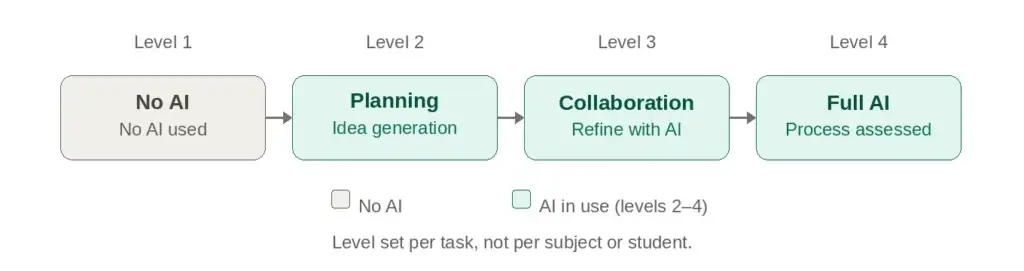
- Level 1 – No AI: the task is designed to be completed without any AI input.
- Level 2 – AI Planning: students can use AI to help deconstruct a task, clarify a concept, or generate research ideas.
- Level 3 – AI Collaboration: students input drafts and receive AI feedback aligned to the marking rubric before refining their own work.
- Level 4 – Full AI: AI can generate content directly, with the assessment then judging the student’s prompting and evaluation of that output, not the output itself.
“We took the structure from Leon Furze’s scale and adapted it to what we needed,” Wilson says. “It gives us common language and clear expectations.” The college explicitly communicates the AI-use level for each assessment task, with teachers creating scaffolded EP tasks that align to the level. “We’re not just saying ‘AI is allowed’ or ‘AI is banned,'” Wilson says. “We’re guiding them through what responsible use looks like for that specific piece of work.”
Neither school, St Mary MacKillop College nor Bob Hawk College, needed a full curriculum rebuild. Both needed a clear view of what a given assessment was actually trying to find out, and a structure to redesign around that.
How can teachers use generative AI without losing control of the thinking?
Three uses stand up better than most in the research literature, according to Dr Nidhi Sachdeva, a science of learning researcher at the University of Toronto’s OISE, writing with Dr Peter Zhang in Faculty Focus:
- Lesson planning. A first draft tailored to a year level and topic gives a starting point instead of a blank page. The judgement on whether it fits a specific class still sits with the teacher.
- Tailoring explanations. Asking a tool to translate a concept into simpler language, or generate an analogy suited to a class’s interests, speeds up work that would otherwise mean writing the same explanation three different ways by hand.
- Generating retrieval practice. Low-stakes quiz questions and short recall prompts are quick for AI to produce and expensive for a teacher to write from scratch every week. Retrieval practice has close to a century of evidence behind it; the bottleneck was never the theory, it was the time to build the questions.
Titmanis uses generative AI the same way when building assessments. He doesn’t use it to write the assessment itself, but as a thought partner: asking for twenty possible questions on a topic, then keeping the ones worth keeping. A 2026 review from Stanford’s SCALE Initiative backs the underlying pattern: tools that scaffold reasoning support learning, while tools that generate a finished answer outright can remove the cognitive effort that builds durable skills.
What does this mean for teacher judgement more broadly?
Teacher education bodies are already grappling with a version of this question. The American Association of Colleges of Teacher Education released a 2026 framework pushing university programmes beyond tool-specific training and towards the ethics, policy and cognitive trade-offs of AI use. Anne Tapp Jaksa, quoted in Education Week, frames the tension plainly:
“AI forces us to reconsider what counts as evidence of learning… If a candidate can use AI to generate a polished lesson plan or reflection or an assessment, the important question becomes whether that product actually demonstrates the candidate’s own professional reasoning.”
The same test is worth applying closer to home. A Year 11 student’s polished essay and a lesson plan a Head of Department pulled together in ten minutes before Monday’s period one can both look finished without either person having done much of the actual thinking. The tell isn’t how good the output looks: it’s whether the person could explain, unprompted, why a particular choice was made.
Common mistakes to watch for
- Treating “AI” as one category. A chatbot that finishes a paragraph and a feedback tool that returns it for revision sit at opposite ends of the same label. “AI” isn’t one thing, and not every useful tool wearing the label deserves it. Victor Canela, a Physics teacher at Diocesan School for Girls, gets some of his clearest classroom insight from a feature that isn’t AI at all: a straightforward analytics dashboard that shows him where a whole class is stumbling on the same idea. “You can’t always see the patterns when you’re just going through workbooks,” he says. “EP makes those patterns clear.” The lesson holds either way: judge what a tool actually does, not what it’s called.
- Waiting for perfect policy before starting. Titmanis’s department made progress on teacher workflow long before student-facing chatbots were approved. Schools can start with controlled teacher-facing uses while student-use policies are still evolving.
- Skipping the second attempt. A single round of AI feedback with no requirement to revise gets read once and ignored, much like a comment at the bottom of a returned essay.
- Leaving the AI-use level unstated. St Mary MacKillop’s experience suggests the risk isn’t AI use itself, but ambiguity about what’s allowed on a given task. Naming the level removes the guesswork for students and staff alike.
FAQs
Will AI replace classroom teachers?
No. Titmanis and Smith both point to the same limit: AI tools handle repetitive marking and content adjustment, but the connection to students, the read of a room, and the context of a specific school and community stay with the teacher.
What’s the fastest way to see a return from AI in a department?
Feedback on open-ended responses and differentiation for mixed-ability classes are the two areas teachers report the clearest time returns on, largely because they’re the two tasks hardest to do by hand at scale.
How does an AI feedback loop help with marking, specifically?
It gives a first pass on open-ended responses within seconds rather than days, and a loop that returns below-standard answers for another attempt turns that speed into an actual improvement in the response, not just a faster score.
Should schools ban AI tools to protect academic integrity?
Banning rarely helps, since access outside school hours is hard to control. Redesigning what gets assessed — more in-class validation, tasks that test application rather than information-finding, and a clear per-task AI-use scale — tends to hold up better in practice.
What’s a practical way to communicate AI rules to students without a blanket ban?
St Mary MacKillop College assigns each assessment task an AI-use level, from no AI through to full AI with disclosure, using Leon Furze’s AI Assessment Scale. Naming the level of AI use on the task itself removes ambiguity for students and staff.
Is there solid evidence AI improves learning, not just performance in the moment?
Not conclusively yet. A 2026 Stanford SCALE review found only 20 rigorous causal studies among more than 800 examined on AI in K-12 education. Task performance gains are easier to show than durable, long-term learning gains, and the two aren’t the same thing.
Related articles
- Differentiation in the Classroom: What It Is and How to Implement It
- How to Use ChatGPT as a Teacher Without Losing the Plot
- Assessment for Learning: Principles, Examples and Practice
- Blended Learning in the Classroom
- AI in Education
Case studies referenced
- St Mary MacKillop College: A framework for responsible AI
- Diocesan School for Girls: The EP learning cycle in action
References
- Association of School Business Administrators (ASBA) (2025). AI: Risk and Opportunities for Independent Schools.
- Education Perfect (2026). AI for Teaching: A Practical and Pragmatic Approach [webinar with Shane Smith and Matt Titmanis, Bob Hawk College].
- Education Perfect (2026). Instant Feedback, Lasting Impact [internal research summary; 10-week ANZ study, 19,500 students, ~250,000 answers]. View PDF
- Education Perfect (2026). St Mary MacKillop’s Approach to AI Integration [case study].
- Education Perfect (2026). The EP Learning Cycle in Action: Diocesan School for Girls [case study].
- SCALE Initiative, Stanford University (2026). Understanding the Evidence Base for AI in K-12 Education.
- Sachdeva, N. & Zhang, P. (2026). Why (and How) Teachers Should Use Generative AI in the Classroom. Faculty Focus.
- Education Week (2026). How Should AI Shape Teacher Education?
- Furze, L. AI Assessment Scale [framework referenced by St Mary MacKillop College].
An AI Tool for Your Classroom
Developed by teachers, for teachers, Education Perfect (EP) is a complete digital learning, assessment and analytics toolkit that empowers teachers to personalise learning at scale and meet evolving classroom needs.
See AI feedback in practice
See how EP’s AI-powered feedback tool gives students immediate, actionable feedback while keeping teachers in control of the learning. Request a free trial.